Monthly Archives: February 2009

PHP Best Practices #2: Strictures

Make sure PHP is reporting all errors and warnings.

Warnings and notices are PHP’s way of letting you know that you are utilising features in a non-standard way. If your code is omitting errors, then it should be fixed as soon as possible. Strict warnings are a class of errors that are turned off by default in most PHP installations. Turning on strict warnings gives you another level of error reporting, which is helpful to prevent you from using misusing functions, making sure your code is compatible with future PHP versions.

In the example here, using date() without explicitly setting a timezone will result in an E_STRICT warning. In this case, we are using a function called strictErrors to tell PHP to report all error types.

Example

    <?php
    
    function strictErrors() {
        $reporting_level = E_ALL;
        
        // if version of PHP < 6, explicity report E_STRICT
        if ( version_compare( PHP_VERSION, '6.0.0', '<' ) ) {
            $reporting_level = E_ALL | E_STRICT;
        }
        
        return error_reporting( $reporting_level );
    }
    

    // turn on strict error and warnings
    strictErrors();
    
    // produces strict warning
    echo date( "d-M-Y" );
    
    // no warning
    date_default_timezone_set( 'Europe/London' );
    echo date( "d-M-Y" );
    
    ?>

Further information

Glen Scott

I’m a freelance software developer with 18 years’ professional experience in web development. I specialise in creating tailor-made, web-based systems that can help your business run like clockwork. I am the Managing Director of Yellow Square Development.

More Posts

Follow Me:
TwitterFacebookLinkedIn

Objects in Perl (part 2,352)

One of my issues with Perl has always been its implementation of OOP. Or, to be precise, the multitude of ways that a class can be declared (blessed hash, inside-out, Class::Std etc). I would argue that this is a case where TMTOWTDI is not advantageous. Enter Piers Cawley and his _Moose for Ruby Programmers_ talk at the London.pm Technical Meeting, 20th February 2009. MooseX::Declare is yet another way, but check this out…

    use MooseX::Declare;

    class BankAccount {
        has 'balance' => ( isa => 'Num', is => 'rw', default => 0 );

        method deposit (Num $amount) {
            $self->balance( $self->balance + $amount );
        }

        method withdraw (Num $amount) {
            my $current_balance = $self->balance();
            ( $current_balance >= $amount )
                || confess "Account overdrawn";
            $self->balance( $current_balance - $amount );
        }
    }

    class CheckingAccount extends BankAccount {
        has 'overdraft_account' => ( isa => 'BankAccount', is => 'rw' );

        before withdraw (Num $amount) {
            my $overdraft_amount = $amount - $self->balance();
            if ( $self->overdraft_account && $overdraft_amount > 0 ) {
                $self->overdraft_account->withdraw($overdraft_amount);
                $self->deposit($overdraft_amount);
            }
        }
    }

Firstly, yes, that is indeed Perl. Secondly, wow: it actually _looks_ like a class definition. And this was the big win for me, as anyone coming from a Java or PHP background will find it trivial to understand what’s going on here. The main point is that by using MooseX::Declare, you are moving towards a more declarative programming style describing _what_ the program should do rather than _how_ it should achieve it. So, no more unrolling `@_` 🙂

Links

Glen Scott

I’m a freelance software developer with 18 years’ professional experience in web development. I specialise in creating tailor-made, web-based systems that can help your business run like clockwork. I am the Managing Director of Yellow Square Development.

More Posts

Follow Me:
TwitterFacebookLinkedIn

PHP Best Practices #1: Regular expressions

preg not ereg

This is the first in what I hope will be a regular series of posts on PHP best practices, inspired in part by Damian Conway’s Perl Best Practices book.

Historically, PHP has had two incompatible regular expression engines available, POSIX Extended and PCRE (Perl Compatible Regular Expressions). Arguably, Perl-compatible regular expressions are more powerful since they support non-greedy matching, assertions, conditional subpatterns and a number of other features not supported by POSIX Extended. More importantly, the POSIX Extended extension is deprecated as of PHP 5.3, meaning that a call to any of its functions, such as `ereg`, will emit a `E_DEPRECATED` notice. Therefore, for any regular expression functionality in your scripts, use the PCRE set of functions which are prefixed with `preg_`.

Example

    $pattern = '/Hello/x';
    $subject = 'Wake up and say Hello.';
    $matches = array();
    
    if ( preg_match( $pattern, $subject, $matches ) ) {
        print_r( $matches );
    }

Output:

    Array ( [0] => Hello )

Further information

Glen Scott

I’m a freelance software developer with 18 years’ professional experience in web development. I specialise in creating tailor-made, web-based systems that can help your business run like clockwork. I am the Managing Director of Yellow Square Development.

More Posts

Follow Me:
TwitterFacebookLinkedIn

PhpDocumentor in 5 minutes

Help Point

Introduction

This is a quick and dirty guide to the absolute minimum you need to get up and running with PhpDocumentor.

One of the slightly off-putting aspects of PhpDocumentor is the amount of tags (`@`) that are available, which can initially be overwhelming. e.g. see PEAR example:

PEAR sample file

This guide shows you the most important tags that you need to have in your documentation by means of an actual example: `Accumulator.php`.

Assumptions

  • You are on a UNIX based machine, which includes Linux and Mac OS X.
  • You are documenting object oriented rather than procedural code

Install

PhpDocumentor is part of PEAR. Install is easy:

sudo pear install phpdocumentor

Documenting your source code

The rules:

  • One class per file
  • One docbook block for the class, not for the file
  • Filename is `.php`

For the class:

  • short description
  • code example
  • @author

For each attribute:

  • short description
  • @var

For each method:

  • short description
  • @param
  • @return
  • @see

Example class with documentation

Accumulator.php

    <?php
    
    /**
     * An instance of this class represents a counting machine
     *
     * <code>
     * require_once 'Accumulator.php';
     * 
     * $acc = new Accumulator( 10 );
     * 
     * $acc->addNum( 20 );
     * 
     * echo $acc->getTotal();
     * </code>
     *
     * @author Glen Scott <glen @ glenscott.co.uk>
     */
    class Accumulator {
        /**
         * The running total
         *
         * @var int
         */
        private $_number;
        
        /**
         * Create an instance, optionally setting a starting point
         *
         * @param int $initial an integer that represents the number 
         *                     to start counting from
         * @access public
         */
        public function __construct( $initial = 0 ) {
            $this->_number = $initial;
        }
        
        /**
         * Adds a number to the running total
         *
         * @param int an integer to add to the running total
         */
        public function addNum( $num ) {
            $this->_number += $num;
        }
        
        /**
         * Returns the current total
         *
         * @return int returns the current running total
         * @see Accumulator::$number
         */
        public function getTotal() {
            return $this->_number;
        }
    }

Creating your documentation

phpdoc --filename Accumulator.php --target docs

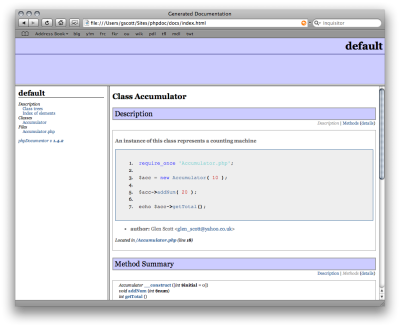
The docs directory is created and some HTML files are generated. Load docs/index.html into your browser to read your documentation.

PhpDoc sample page

Possible issues

phpdoc: command not found. This means that the documentation generator script is not in your path. Run pear config-get bin_dir and add this directory to your shell’s $PATH environment variable.

Links


Want advice on building better software? Join my mailing list…


Glen Scott

I’m a freelance software developer with 18 years’ professional experience in web development. I specialise in creating tailor-made, web-based systems that can help your business run like clockwork. I am the Managing Director of Yellow Square Development.

More Posts

Follow Me:
TwitterFacebookLinkedIn

Steve Krug on Usability Testing

Good introduction to usability testing on a budget:

Glen Scott

I’m a freelance software developer with 18 years’ professional experience in web development. I specialise in creating tailor-made, web-based systems that can help your business run like clockwork. I am the Managing Director of Yellow Square Development.

More Posts

Follow Me:
TwitterFacebookLinkedIn