Patience is one of the characteristics of monastic life, but even the patience of the Brothers was being tested by our slow internet
Monthly Archives: July 2008
Wahey, new Delicious is out!
Over the past few days we’ve been transitioning Delicious over to our new platform, quietly starting with RSS feeds and APIs. Today we’re taking the final step and flipping the switch on the new web site: delicious.com.
Zimbra Desktop allows offline access to Yahoo/Gmail/AOL Mail
Nice app for managing your e-mail from a desktop application for PC, Mac and Linux:
Why I won’t be upgrading to the iPhone 3G
I’m really happy with my iPhone, but I must admit I was initially tempted to upgrade to the new 3G version which is released this Friday. However, after thinking things through I’ve decided to stick with the “old” version. Why? Well, with the free OS 2.0 upgrade, I will get these features for free anyway:
- Native applications
- Cisco IPSec VPN support
- MobileMe
- Improved mail client
- Enhanced contact management
- Better battery life
Meaning the only differences between my iPhone and the 3G iPhone is:
- 3G
- GPRS
So it boils down to whether I want to pay £99 for these two features. And I don’t: they are nice options, but far from essential. 3G is faster than EDGE, but for general browsing of websites I don’t think it will make a huge difference, especially because many sites serve up optimised iPhone pages already. Furthermore, enabling 3G on the phone will zap the battery faster than when using EDGE. And GPRS, while a nice idea, is far from essential in my day-to-day usage of the phone right now.
Useless Mac Applications #2 : Adobe Reader
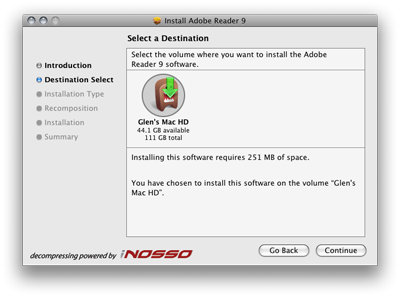
A classic example of an application that started off performing a simple, useful task (i.e. displaying PDF documents) and has grown to an overly complex, slow, hulking beast of an application.
I got scared off by the 251Mb disk space the installer claims that it needs:

I’ll stick to Apple’s Preview.app, thanks.
Automatically virus scan your downloads folder
Okay, so there are not really any Mac specific virus threats, but there are tonnes for Windows… and you don’t want to be passing these on to your PC owning friends right? Best be safe…
- Download and install ClamXav
- Launch ClamXav application
- Go into preferences and click the Folder Sentry tab
- Drag your Downloads folder from the Finder to the Folders Being Watched pane
- Check the Launch ClamXav Sentry when you log in to this computer option
- Log out and log back in to your account and you will see a new item in your menu bar indicating that Sentry is monitoring your Downloads folder
- The Sentry uses Growl notifications if it finds anything suspicious