links for 2008-10-30

Uncategorized — Glen @ 8:07 pm

Share/Save/Bookmark

Wise Words from Martin Fowler

programming — Tags: , , , , , , — Glen @ 11:16 pm

I’ve become quite obsessive about unit testing recently, and in particular the PHPUnit testing framework. A big proponent of test-driven development is Martin Fowler, and I keep one of his quotes in a sticky note on my desktop as a little reminder:

Whenever you are tempted to type something into a print statement or a debugger expression, write it as a test instead.

The PHPUnit manual is really well written, and contains a great guide for writing your first tests.

Share/Save/Bookmark

ADSL router for sale

computing — Tags: , , , , — Glen @ 11:04 pm

I’ve put my spare ADSL router onto eBay. If you’re interested, bidding starts at 99p:

SpeedTouch 580 Wireless Multi-User ADSL Gateway on eBay, also Wireless Routers Access Points, Wireless Networking, Networking, Computing (end time 03-Nov-08 18:13:43 GMT)

Share/Save/Bookmark

GoboLinux proves that AmigaOS was ahead of its time

computing, mac — Tags: , , , , , , — Glen @ 10:18 pm

GoboLinux is described as “an alternative Linux distribution which redefines the entire filesystem hierarchy”. Not particularly snappy, but the concept behind it is very clean and simple: there is no need for package management, because every program resides in its own directory. This is a great concept because it means you don’t get libraries scattered around your system which can cause dependency problems, and makes un-installing applications much easier.

GoboLinux uses the filesystem to organise program installation so that, for example, OpenOffice and all of its required files would be installed under /Programs/OpenOffice/3.0/.

Mac OS X also uses this concept: right-click on an application in /Applications and select the Show Package Contents option to see this in action.

A post entitled An old OS idea is new again: non-installation by Carl Sassenrath reminded me that the AmigaOS was doing this back in 1985.

I have a lot of time for the Amiga, and particularly its OS. As well as this “non-installing” feature, one of my favourite concepts was the DataType. This was a method of allowing the OS and its applications to recognise new filetypes by abstracting the loading, decoding and saving of file formats into a file descriptor. It meant, for instance, that you could add PNG support to a graphics application simply by dropping a PNG DataType file into the Prefs/Datatypes directory.

Share/Save/Bookmark

Synchronize iCal with Yahoo! Calendar

mac, webapps, yahoo — Tags: , , , , — Glen @ 1:20 pm

The new beta of Yahoo! Calendar now supports the CalDAV protocol, meaning that sharing and synchronizing with desktop calendaring applications is possible.

iCal has supported CalDAV since version 3.0 shipped with Mac OS X 10.5 Leopard, so it is possible to get it working with Yahoo! Calendar. After completing the following steps, any events that you create in the web-based Calendar will be replicated to iCal, and vice-versa.

What you will need:

  • A Yahoo! account. In the example, we use the username yahoouser
  • Access to the new Calendar Beta.
  • iCal version 3 or above

Step 1:

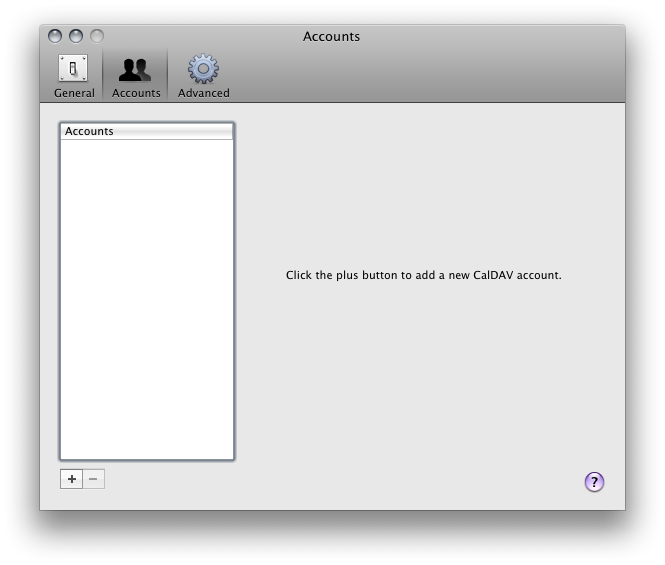
  • In iCal, select the Preferences… from the iCal menu.
  • Click on the Accounts icon

  • Click on the plus button to create a new CalDAV account
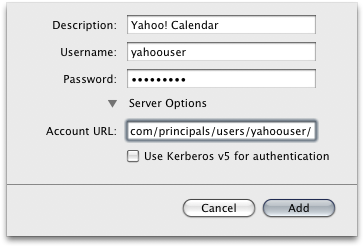
  • Enter a description, such as Yahoo! Calendar, your Yahoo! username and password.
  • Click the Server Options link and enter the following into the Account URL field:
https://caldav.calendar.yahoo.com

  • Click the Add button.


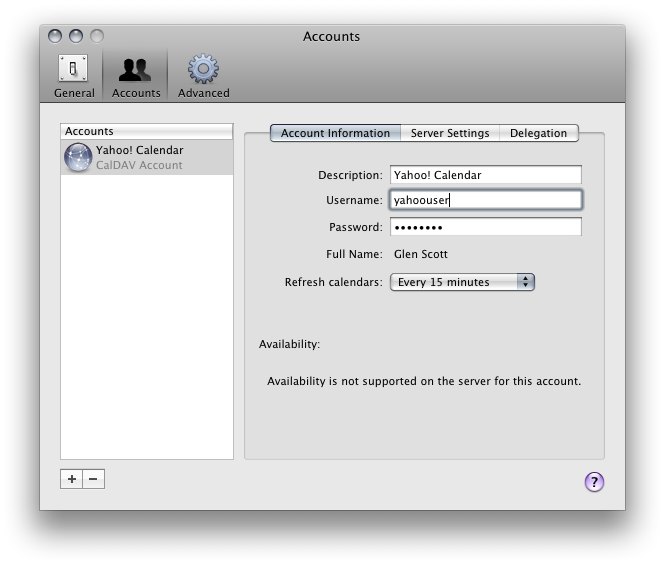
Your Yahoo! Calendar should now be synchronized with iCal, refreshing every 15 minutes: you should see it listed on the left hand side of your iCal window underneath the calendars stored on your Mac.

Share/Save/Bookmark

M865 Project Management

open university — Tags: , , , — Glen @ 10:38 pm

So I’ve completed another module for my Postgraduate Diploma in Software Development. It was the project management course, and I have to say it was the most challenging one so far. It was an optional module, but I thought it would be interesting as I am starting to take on more managerial tasks at work.

A lot of the concepts in the course were completely new to me, so there was a lot of information to take in. The course was divided into the following units:

  1. Project initiation
  2. Risks, estimates and contracts
  3. Planning
  4. Building and leading the team
  5. Project execution
  6. Standards, methodologies and reflections

As my previous modules had been a lot more technical, this was a refreshing change. It really helped me to see the overall view of a project rather than just a small aspect of it, as I would ordinarily experience as a programmer.

The course text was very well written, and used good examples throughout. As part of the course assessment, I had to use a real project that I have involvement in as an example. This was a useful feature of the course as it help to relate my learnings to the real world.

Out of all of the courses I have taken so far, this is definitely the one in which I have learnt the most so in this respect it has been very worthwhile.

My next course starts on 1st November, and I have chosen M877 Advanced Database Technologies, which should be just as interesting, if somewhat more technical.

update, 9th December 2008: I can breathe a huge sigh of relief as the results are in and I’ve passed the course!

Share/Save/Bookmark

No More X11 - OpenOffice 3.0 is a Native Mac Application

mac, open source — Tags: , — Glen @ 1:20 pm

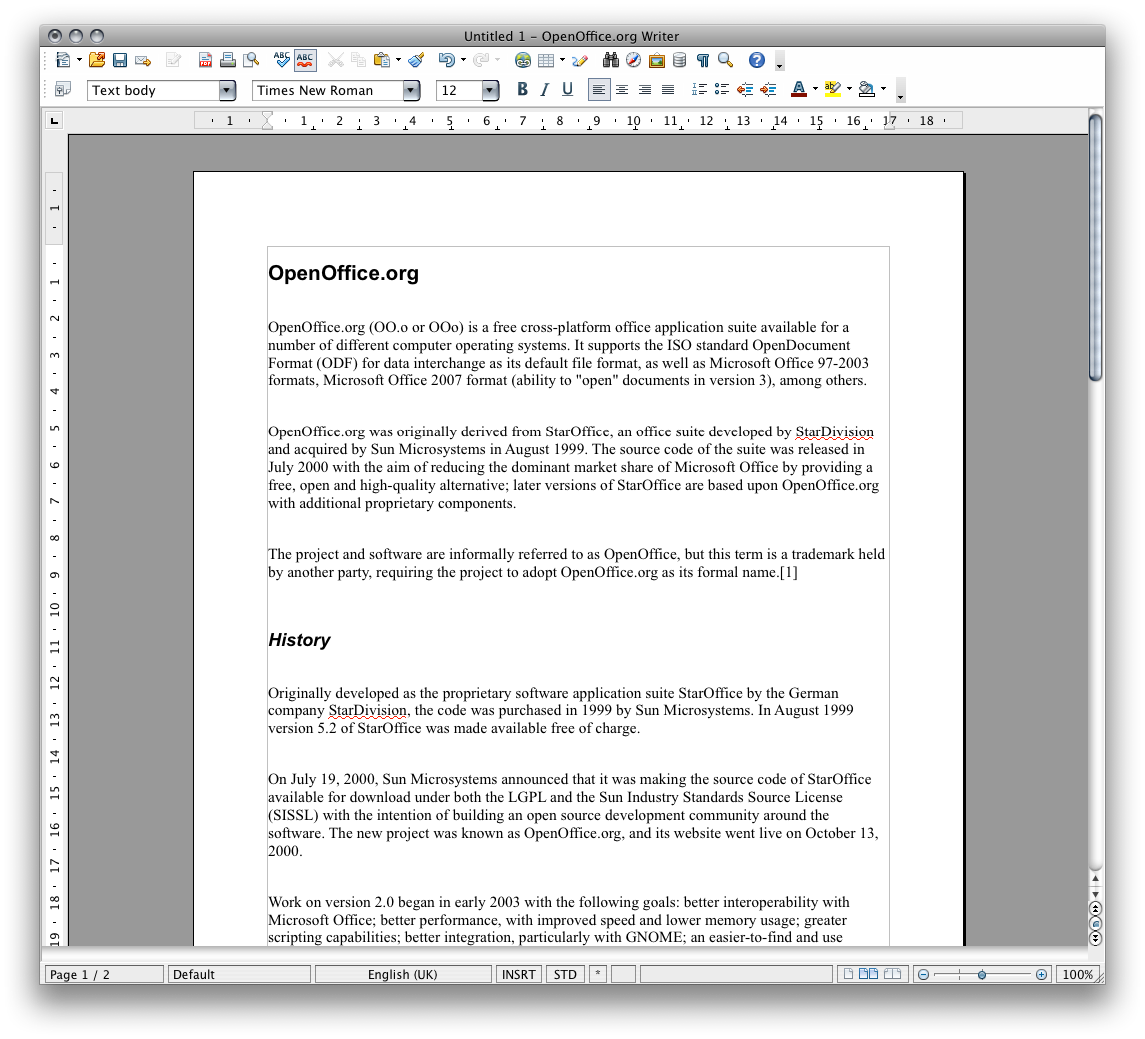
The latest version of OpenOffice is now a native OS X application, meaning no more launching Apple’s X11 to get it running.

OpenOffice 3.0 on Mac OS X

OpenOffice.org 3.0 officially released
Download OpenOffice 3.0 for Mac OS X (Intel)

Share/Save/Bookmark

New BBEdit Search and Replace Window

mac, programming — Tags: , , , , — Glen @ 1:03 pm

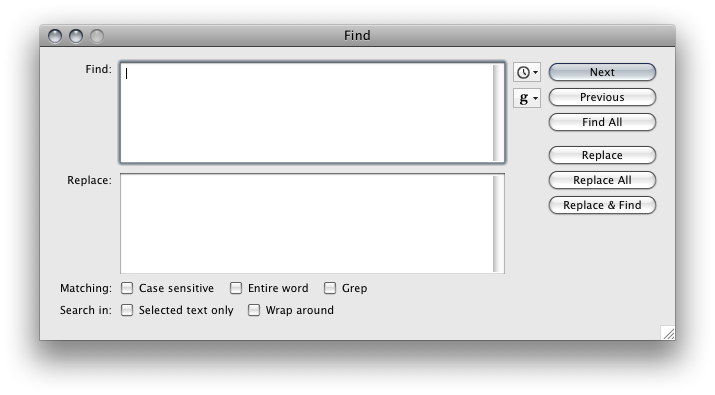
One of the new features of BBEdit 9 is the new Find/Replace Window, shown below:

BBEdit search and replace window

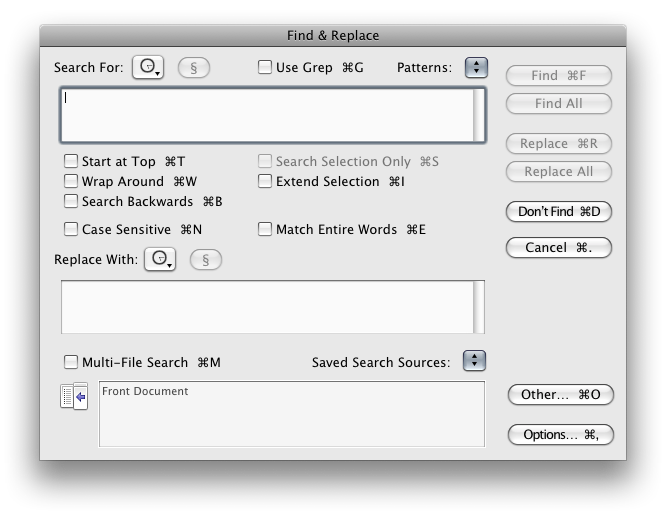
It’s been simplified a lot since the last version, but the really big change is that it is now a modeless window. This means that the Find/Replace window can be left open whilst still allowing interaction with document windows. Initially, this seemed like a good feature to me before I realised a side-effect of this change: there are no keyboard shortcuts for the Find/Replace options anymore. You can see the difference by looking at the old Find/Replace window:

BBEdit search and replace window

In this example, the Command key is being held down to illustrate which shortcuts are available; for example, Command-G toggles the Grep support.

Because of the Modeless window, these shortcuts have been lost in BBEdit 9. This makes the Find/Replace window slightly more cumbersome to use as turning on search options now requires the mouse. Furthermore, the very useful Start At Top option, has been removed completely.

Update: Thanks to Rich Siegel, CEO of Bare Bones Software, who has pointed me towards the release notes which document some brand-new Find shortcuts, thus rendering this blog post mostly pointless. Hurrah!

Share/Save/Bookmark

Are you getting paid enough?

Uncategorized — Tags: , , , — Glen @ 1:15 pm

Ever wondered what other people doing your job are getting paid? A new site called upyourkick.com has launched allowing you to see just that. Check it out:

upyourkick.com

Share/Save/Bookmark

Flickr Panda Spews Interesting Photographs

flickr, photography, yahoo — Tags: , , — Glen @ 10:14 am

Flickr Panda

Bizarre way of checking out the latest interesting uploads on Flickr:

Flickr: Panda

Share/Save/Bookmark

Next Page »
This work is licensed under a Creative Commons Attribution-Noncommercial-Share Alike 3.0 Unported License.
(c) 2009 Glen Scott - Keeping it simple, since 1977 | powered by WordPress with Barecity